Structure Models (PDB / mmCIF)
The Structure Models view allows you to manage, inspect, visualize, and download 3D structural models (PDB or mmCIF) associated with your project entries.
[!NOTE] Native Format Preservation & Multi-Format Downloads: Uploaded structure models (
.pdb,.cif, and.mmcif) are preserved in their native format upon upload and saved directly to the database without lossy conversion. When downloading selected models, you can choose to download in their original format, convert all to standard PDB format (.pdb), or convert all to standardized mmCIF format (.cif) with dual residue numbering. For interactive 3D visualization, Mol* streams standardized mmCIF with dual residue numbering (continuous mature linear position and scheme-specific numbering on variable domains) dynamically on the fly.
This tool is useful for inspecting the sequences extracted from structure models, matching them to your entry sequences, downloading or deleting selected structure models, and visualizing the 3D structures.
Accessing the Tool
Go to the Edit menu in the Project View and select Structure Models. This will open the structure models interface in a new tab.
Using the Tool
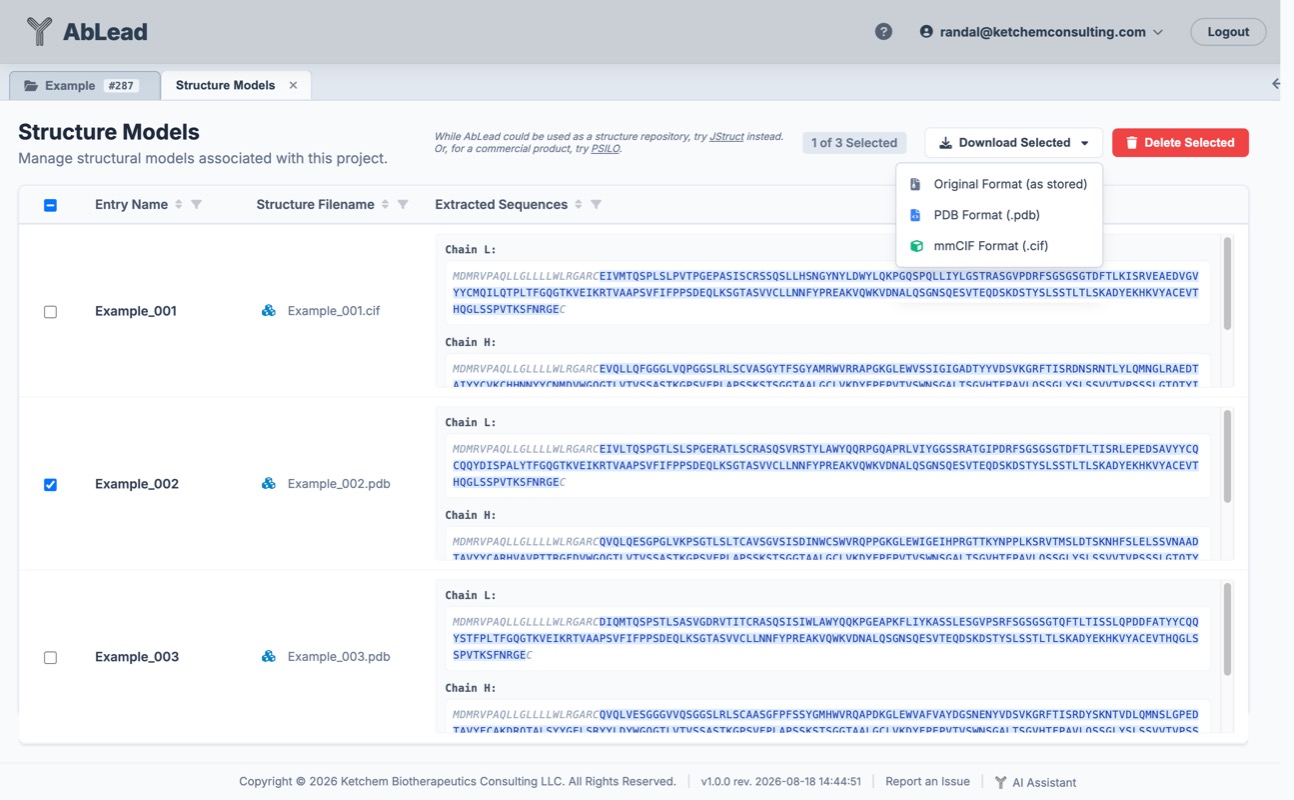
- Structure Filename: Displays the name of the structure model (PDB or mmCIF). Clicking the button to the left of the filename toggles the 3D structure viewer.
- 3D Structure Viewer: Click the toggle button to open/close the Molstar window at the bottom of the page to visualize the 3D structure. The backbone is colored by region (FMWK, CDRs) using the project's color system. Residues and side chains are not displayed to keep the view clean.
- Draggable Pane: The viewer pane can be resized by dragging the handle at the top of the pane.
- Extracted Sequences: Displays the sequences extracted from the structure model, broken down by chain. Residues that match the entry sequence are highlighted.
-
Download Selected: Select one or more entries and choose a format from the dropdown menu:
- Original Format (as stored): Downloads structures in their native uploaded or built format (single file if one selected, or
{project}_Structures_Original.zip). - PDB Format (.pdb): Converts any mmCIF structures dynamically to standard PDB format (single
.pdbor{project}_Structures_PDB.zip). - mmCIF Format (.cif): Converts any PDB structures dynamically to standardized mmCIF format with dual numbering (single
.cifor{project}_Structures_mmCIF.zip).
- Original Format (as stored): Downloads structures in their native uploaded or built format (single file if one selected, or
-
Delete Selected: Select one or more entries and click to remove the structure models from the entries. This does not delete the associated entries.
While AbLead can be used as a structure repository, for more robust solutions consider using JStruct or commercial products like Molecular Operating Environment's PSILO.
References
- PDBe Mol* is used for 3D structure visualization. See Mol* for details.
- ImmuneBuilder (ABodyBuilder2, NanoBodyBuilder2, and TCRBuilder2) is described in ImmuneBuilder on GitHub.